

Deploy attribution
Upload release metadata and the graph that shipped so TrueClara can register a reward experiment and the broken-URL guardrail against a deploy.
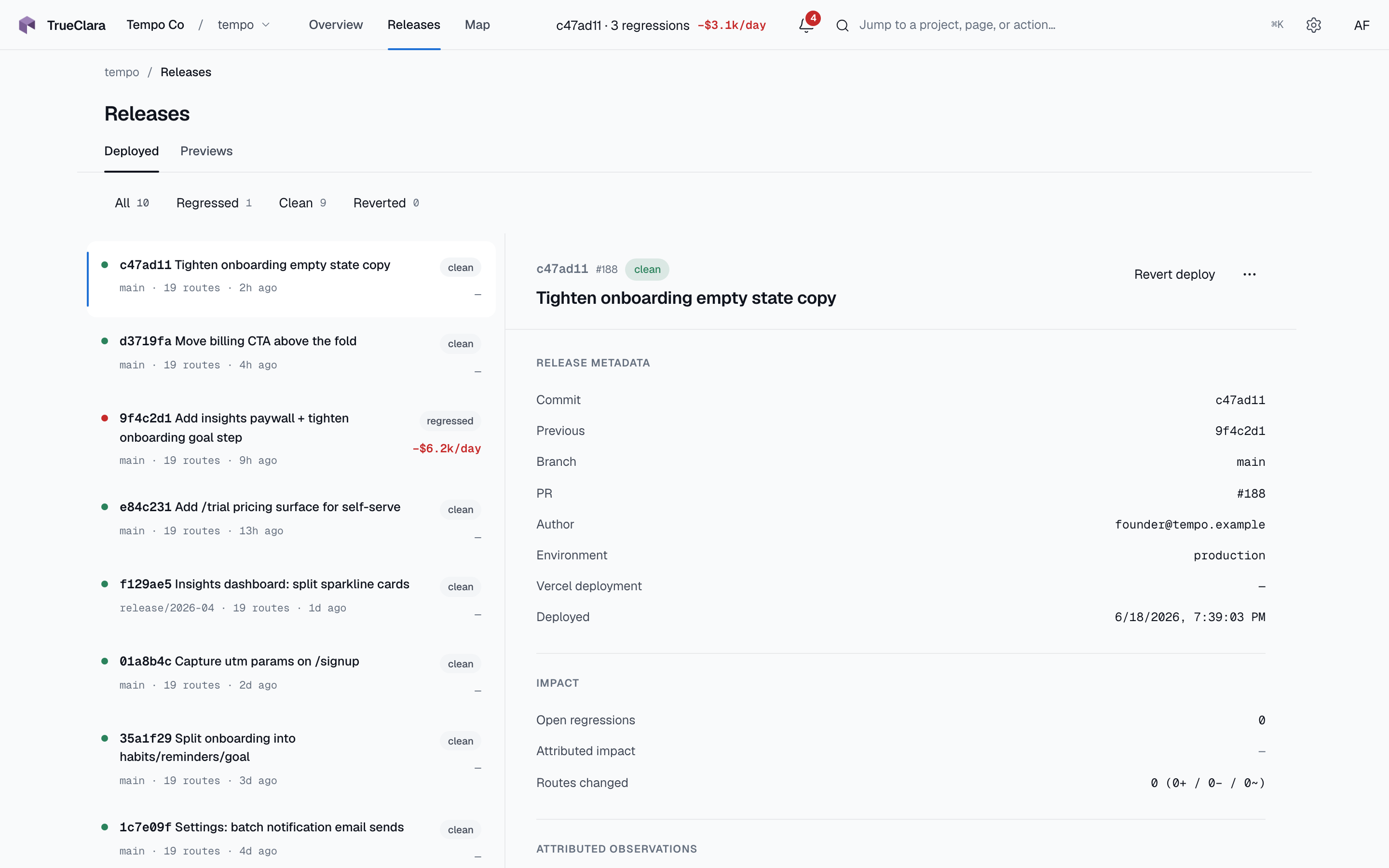
Deploy attribution records the release boundary for a project. The deploy is the trigger: it connects graph changes and runtime behavior to the commit that shipped, and registering it starts a randomized canary experiment over the reward API.
CI boundary
Upload deploys at the same point your team treats as production.
- Use one TrueClara project per environment.
- Use a non-shallow checkout so previous commits can be resolved.
- Keep
TRUECLARA_PROJECT_KEYin CI secrets only. - Run the parser against the exact app version being deployed.
Minimal workflow
name: trueclara-deploy

on:
  push:
    branches: [main]

jobs:
  upload:
    runs-on: ubuntu-latest
    steps:
      - uses: actions/checkout@v4
        with:
          fetch-depth: 0
      - uses: actions/setup-node@v4
        with:
          node-version: 20
      - run: npx @trueclara/parser . --pretty -o trueclara-graph.json
      - run: node scripts/post-trueclara-deploy.mjs
        env:
          TRUECLARA_PROJECT_KEY: ${{ secrets.TRUECLARA_PROJECT_KEY }}
          TRUECLARA_ENVIRONMENT: production
The public trueclara/deploy-action@v1 package is still in beta verification. Until it is public, post to the deploy API from a small script in your repo.
The deploy script
Create scripts/post-trueclara-deploy.mjs with the contents below (pure Node ≥18, no dependencies — vendor it so you can read exactly what runs in your CI). It reads git / GitHub Actions metadata, computes the route diff against your last recorded deploy, and posts to /v1/deploys.
Prefer not to paste it? Download the same file:
curl -fsSL https://trueclara.com/install/post-trueclara-deploy.mjs -o scripts/post-trueclara-deploy.mjs
#!/usr/bin/env node
// scripts/post-trueclara-deploy.mjs
// Uploads a deploy record so a reward experiment (and the broken-URL guardrail)
// can be registered against the release that introduced it. Run after:
// npx @trueclara/parser . --pretty -o trueclara-graph.json
//
// Required env: TRUECLARA_PROJECT_KEY
// Optional env: TRUECLARA_ENVIRONMENT (default "production"),
//               TRUECLARA_API (default "https://api.trueclara.com"),
//               TRUECLARA_GRAPH (default "trueclara-graph.json"),
//               VERCEL_DEPLOYMENT_ID
import { readFileSync } from "node:fs";
import { execSync } from "node:child_process";

const API = (process.env.TRUECLARA_API || "https://api.trueclara.com").replace(/\/+$/, "");
const KEY = process.env.TRUECLARA_PROJECT_KEY;
const ENVIRONMENT = process.env.TRUECLARA_ENVIRONMENT || "production";
const GRAPH_PATH = process.env.TRUECLARA_GRAPH || "trueclara-graph.json";

if (!KEY) {
  console.error("TRUECLARA_PROJECT_KEY is not set.");
  process.exit(1);
}

function git(args, fallback = "") {
  try {
    return execSync(`git ${args}`, { encoding: "utf8" }).trim() || fallback;
  } catch {
    return fallback;
  }
}

function readGitHubEvent() {
  if (!process.env.GITHUB_EVENT_PATH) return null;
  try {
    return JSON.parse(readFileSync(process.env.GITHUB_EVENT_PATH, "utf8"));
  } catch {
    return null;
  }
}

const event = readGitHubEvent();
const headCommit = event?.head_commit ?? null;
const pr = event?.pull_request ?? null;

const commitSha = process.env.GITHUB_SHA || git("rev-parse HEAD");
if (!commitSha) {
  console.error("Could not determine the commit SHA (not a git checkout?).");
  process.exit(1);
}
const previousCommitSha =
  typeof event?.before === "string" && /^[0-9a-f]{40}$/.test(event.before)
    ? event.before
    : git("rev-parse HEAD^", "") || null;
const branch = process.env.GITHUB_REF_NAME || git("rev-parse --abbrev-ref HEAD", "unknown");
const authorEmail = headCommit?.author?.email || git("log -1 --pretty=%ae", "unknown");
const pushedAt = headCommit?.timestamp || git("log -1 --pretty=%cI", new Date().toISOString());

let staticGraph;
try {
  staticGraph = JSON.parse(readFileSync(GRAPH_PATH, "utf8"));
} catch {
  console.error(`Could not read ${GRAPH_PATH}. Run @trueclara/parser first.`);
  process.exit(1);
}

function routePaths(graph) {
  return new Set((graph?.routes ?? []).map((r) => r.path));
}
function edgeMap(graph) {
  return new Map(
    (graph?.edges ?? []).map((e) => [`${e.from}->${e.to}`, { from: e.from, to: e.to }]),
  );
}

let previousGraph = null;
try {
  const res = await fetch(
    `${API}/v1/deploys/last?environment=${encodeURIComponent(ENVIRONMENT)}`,
    { headers: { "x-trueclara-project-key": KEY } },
  );
  if (res.ok) previousGraph = (await res.json())?.deploy?.static_graph ?? null;
} catch {
  // No prior history reachable — first deploy gets an empty diff.
}

const prevRoutes = routePaths(previousGraph);
const curRoutes = routePaths(staticGraph);
const prevEdges = edgeMap(previousGraph);
const curEdges = edgeMap(staticGraph);

const diff = {
  routes_added: [...curRoutes].filter((p) => !prevRoutes.has(p)),
  routes_removed: [...prevRoutes].filter((p) => !curRoutes.has(p)),
  routes_modified: [],
  edges_added: [...curEdges].filter(([k]) => !prevEdges.has(k)).map(([, v]) => v),
  edges_removed: [...prevEdges].filter(([k]) => !curEdges.has(k)).map(([, v]) => v),
  middleware_changed: false,
};

const res = await fetch(`${API}/v1/deploys`, {
  method: "POST",
  headers: { "content-type": "application/json", "x-trueclara-project-key": KEY },
  body: JSON.stringify({
    environment: ENVIRONMENT,
    commit_sha: commitSha,
    previous_commit_sha: previousCommitSha,
    branch,
    pr_number: typeof pr?.number === "number" ? pr.number : null,
    pr_title: pr?.title ?? null,
    author_email: authorEmail,
    pushed_at: pushedAt,
    vercel_deployment_id: process.env.VERCEL_DEPLOYMENT_ID || null,
    static_graph: staticGraph,
    diff,
  }),
});

if (!res.ok) {
  console.error(`TrueClara deploy upload failed: ${res.status} ${await res.text()}`);
  process.exit(1);
}
console.log(`TrueClara deploy recorded: ${commitSha.slice(0, 7)} on ${branch} (${ENVIRONMENT})`);
Payload
Post to POST /v1/deploys with X-Trueclara-Project-Key.
{
  "environment": "production",
  "commit_sha": "abc1234def5678",
  "previous_commit_sha": "9fe8123abcd4567",
  "branch": "main",
  "pr_number": 142,
  "pr_title": "Tighten checkout state handling",
  "author_email": "engineer@example.com",
  "pushed_at": "2026-05-09T01:20:00.000Z",
  "vercel_deployment_id": "dpl_123",
  "static_graph": {},
  "diff": {
    "routes_added": ["/checkout/review"],
    "routes_removed": [],
    "routes_modified": ["/checkout"],
    "edges_added": [],
    "edges_removed": [],
    "middleware_changed": false
  }
}
commit_sha and static_graph are required. previous_commit_sha may be null on the first deploy. Empty diffs are valid.
Verify
After the first successful upload:
- Project setup shows
Deploy received. - Activity shows the deploy record.
- The deploy detail page opens from the returned dashboard URL.
- A reward experiment can be registered against the deploy (see the Reward API), and the broken-URL guardrail can attach to the deploy window.
Failure policy
Fail CI on parser hard errors, authentication rejection, or invalid payloads. Retry transient network failures. If your team soft-fails deploy attribution, make that choice explicit in the workflow logs.